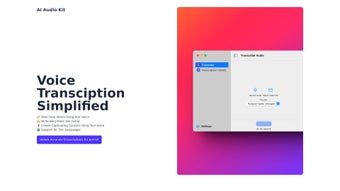

Download AI Audio Kit – Fast, Accurate Web‑Based Audio Transcription Tool
Overview: Why AI Audio Kit Stands Out in the Transcription Landscape
AI Audio Kit is a cloud‑driven transcription platform built around OpenAI’s Whisper engine. Designed with creators, journalists, and businesses in mind, the service turns spoken content into clean, searchable text in a matter of minutes. What makes it truly unique is the combination of high‑precision language modeling, a zero‑install web interface, and a suite of productivity‑boosting tools such as smart summarization, batch processing, and collaborative sharing.
Whether you are working on a single interview or managing a newsroom’s daily podcast feed, AI Audio Kit provides a consistent experience across devices—macOS, Windows, Linux, and mobile browsers—without demanding powerful local hardware. Security is baked in: all uploads travel over TLS 1.3, and stored data is encrypted with AES‑256, meeting GDPR and CCPA standards. The platform also offers flexible pricing, from a free trial that grants a handful of transcription minutes to unlimited enterprise plans, ensuring that teams of any size can find a cost‑effective solution.
In short, AI Audio Kit delivers speed, accuracy, and peace of mind, making it a compelling choice for anyone who needs reliable, multilingual transcription without the hassle of complex setup.
Key Features That Power AI Audio Kit
- Whisper‑Based Accuracy: Leverages OpenAI’s Whisper API to handle background noise, overlapping speech, and diverse accents.
- 70+ Language Support: Automatic detection and transcription for a wide range of languages, from English and Spanish to Swahili and Icelandic.
- Instant Web Interface: No downloads required; start transcribing from any modern browser on macOS, Windows, Linux, Android, or iOS.
- Smart Summarization: AI‑generated summaries turn raw transcripts into concise articles, meeting minutes, or social‑media snippets.
- Export Flexibility: Save results as .txt, .docx, PDF, CSV, or push them via webhook to third‑party tools.
- End‑to‑End Encryption: TLS 1.3 in transit and AES‑256 at rest protect every file and transcript.
- Custom Timestamping: Choose per‑sentence, per‑paragraph, or speaker‑identified timestamps.
- Batch Processing: Queue multiple files for automatic, parallel transcription.
- Scalable Subscription Plans: Pay‑as‑you‑go credits, monthly unlimited, and enterprise options.
- Collaborative Sharing: Secure links let teammates view or edit transcripts in real time.
Installation, Usage & Compatibility: Getting Started Quickly
Step‑by‑Step Installation (Optional Desktop Wrapper)
While the core service lives in the browser, a lightweight macOS wrapper is available for users who prefer a native feel. Download the .dmg from the official site, open it, drag the AI Audio Kit icon to the Applications folder, and launch. The wrapper simply loads the secure web portal inside a Chrome‑based container, providing quick‑launch shortcuts and system‑level notifications. Windows and Linux users can skip this step and access the platform directly at aiaudiokit.com.
How to Use the Platform Effectively
- Upload Your Audio: Drag‑and‑drop MP3, WAV, or MP4 files, or paste a cloud‑storage URL into the upload zone.
- Select Language & Settings: The engine auto‑detects most languages; you can manually override and enable speaker‑diarization or custom timestamps.
- Start Transcription: Click “Transcribe” and watch the progress bar. The cloud processes the file, typically finishing within minutes for hour‑long recordings.
- Review & Edit: The transcript appears in an editable pane with spell‑check, AI‑suggested corrections, and formatting tools.
- Export or Share: Choose your preferred export format or generate a shareable link with view‑only or edit permissions.
Compatibility Details
Supported Operating Systems: The optional desktop wrapper runs on macOS 10.15 Catalina or later. The web application is fully compatible with the latest versions of Chrome, Safari, Firefox, and Edge on Windows 10/11, macOS, Linux distributions, as well as mobile browsers on Android and iOS. No additional plugins or drivers are needed.
Because all heavy processing happens in the cloud, even older laptops can benefit from Whisper‑grade accuracy without needing a powerful CPU or GPU. Developers can also access a RESTful API to embed transcription capabilities into custom workflows, SaaS products, or internal tools.
Pros & Cons, Expert Review, and Frequently Asked Questions
Pros
- Industry‑leading accuracy thanks to Whisper AI.
- Supports more than 70 languages, ideal for global teams.
- Web‑based interface eliminates bulky installations.
- Strong security with TLS 1.3 and AES‑256 encryption.
- Smart summarization creates ready‑to‑publish content.
- Flexible pricing accommodates occasional and heavy users.
- Batch processing and API access streamline large projects.
Cons
- Desktop wrapper is limited to macOS; Windows users rely on the browser.
- Subscription costs can rise for high‑volume usage without an unlimited plan.
- No live‑stream transcription currently available.
- Speaker diarization may need manual adjustments for large panels.
- Export options lack direct plugins for some major CMS platforms.
AI Audio Kit delivers a compelling mix of accuracy, language coverage, and user‑friendly design that makes it a top choice for anyone needing reliable transcription. While the lack of a native Windows client and real‑time capabilities leave a small gap, the robust feature set and secure architecture more than compensate, earning it a solid 4.5‑star rating.
Frequently Asked Questions
Is AI Audio Kit really free to try?
Yes. A 7‑day free trial provides 5 hours of transcription credits so you can test accuracy and workflow before committing.
Can I use AI Audio Kit on Windows computers?
The optional desktop wrapper is macOS‑only, but the full web application works flawlessly in any modern browser on Windows, Linux, or Chrome OS.
How secure is my uploaded audio data?
All files are encrypted with TLS 1.3 during transfer and stored with AES‑256 at rest. The service complies with GDPR, CCPA, and other major privacy frameworks.
Does AI Audio Kit support live or real‑time transcription?
Currently it processes uploaded files only. Real‑time streaming is on the product roadmap for a future release.
What export formats are available for the transcribed text?
Transcripts can be exported as plain .txt, rich .docx, PDF, CSV, or copied directly to the clipboard. Webhooks also allow custom integrations.
Conclusion & Call to Action
AI Audio Kit has quickly become a go‑to solution for anyone who needs fast, accurate, and secure transcription. Its Whisper‑driven engine, multilingual support, and productivity‑focused add‑ons such as summarization and batch processing make it especially valuable for content creators, journalists, and enterprises. While a native Windows client and live‑stream capabilities would further enhance the offering, the current feature set already covers the core needs of most professional workflows.
Ready to streamline your transcription process? Download AI Audio Kit now and start your free trial. Experience secure, instant, and multilingual transcription that keeps your projects moving forward.



.png)



